
If your website isn’t showing up on Google’s first page, you’re missing out on thousands of potential visitors.
What’s the fix? On-Page SEO A Beginner-Friendly Guide with Examples — a must-know technique for anyone serious about ranking on search engines.
In this complete beginner’s guide, you’ll discover how to:
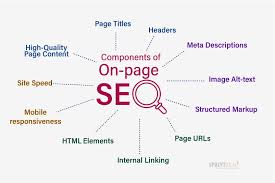
- Find and use the right keywords
- Structure your page like a pro
- Optimize your content with smart formatting
- And see a live example that shows you exactly how it’s done
Ready to make your content rank? Let’s begin
What is On-Page SEO? A Beginner-Friendly Guide with Examples
what is SEO?
SEO stands for Search Engine Optimization —
It is the process of improving your website so that it appears higher in search engine results (like Google, Bing, etc.) when someone searches for something relevant to your content.
Optimization:Optimization means making something better or more efficient, so that it performs at its best.
What is On-Page SEO
On-Page SEO (also called on-site SEO) is the practice of optimizing individual web pages to rank higher in search engines like Google. It focuses on the content.
This includes using the right keywords, title tags, meta descriptions, headings, images, internal links, and more.
Keyword Research
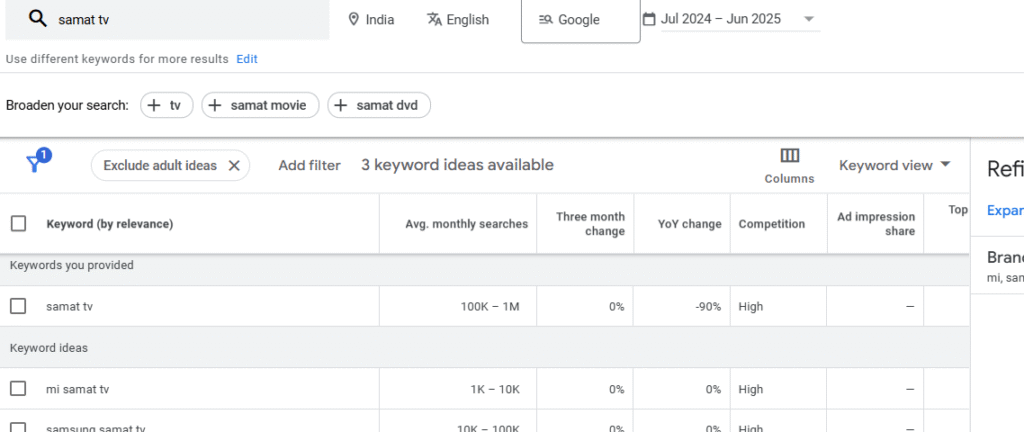
Keyword research is the first and most important step in SEO.On-Page SEO
It helps you discover what people are actually searching on Google.
By finding the right keywords, you can create content that ranks higher and attracts more visitors.
Good keyword research gives your blog or website direction.
In this guide, you’ll learn how to find keywords effectively — even if you’re just starting out.
On-Page Install Yoast

Yoast is the most popular SEO plugin on the planet .And for good reason. Yoast makes it super easy to optimize your WordPress site for search engines. And you can use it on Shopify too. It also helps you with technical SEO stuff, like robots.txt and sitemaps. Making it super versatile. And ideal for beginners that need an all-in-one SEO solution. What is On-Page SEO? A Beginner-Friendly Guide with Examples.What is On-Page SEO? A Beginner-Friendly Guide with Examples
create a high quality content
quality content engages and retains readers. If your content is well-written, informative, and visually appealing, users are more likely to spend more time on your page, reducing bounce rates. This signals to search engines that your content is valuable and user-friendly. Plus, quality content is more likely to attract backlinks from other websites and social media shares. When other reputable websites link to your content, it improves your site’s authority and credibility, which leads to your pages ranking higher on Google.
For example, Buffer acquired 10,000,000+ backlinks from high-authority sites such as Shopify, Calendly, Weebly, and the New York Times. These links aren’t a result of product mentions alone; high-quality, search-optimized content also plays a major role……
Header tags (on page seo)
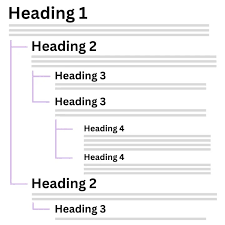
Header tags are an HTML element used to designate headings on your page. The main header tag, called an H1, is typically reserved for the title of the page
The main topic of the page is introduced in the main <h1> heading, and each additional heading is used to introduce a new sub-topic. In this example, the <h2> is more specific than the <h1>, and the <h3> tags are more specific than the <h2>. This is just an example of a structure you could use.
Although what you choose to put in your header tags can be used by search engines to evaluate and rank your page, it’s important to avoid inflating their importance. Header tags are one among many on-page SEO factors, and typically would not move the needle like quality backlinks and content would, so focus on your site visitors when crafting your headings.On-Page SEO
Internal Links
Did you know that adding strategically placed internal links can give your other pages a well-deserved on-page SEO boost?
For example, if you mention a complimentary service on one of your service web pages, you should link that service to the appropriate webpage This not only makes it easier for visitors to navigate your site, but makes it easier for the search engines to crawl and understand your content. For example, if you mention a complimentary service on one of your service web pages, you should link that service to the appropriate webpage This not only makes it easier for visitors to navigate your site, but makes it easier for the search engines to crawl and understand your content.
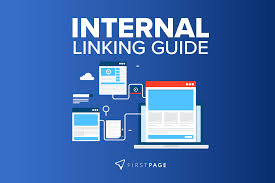
Of course, it’s important to do this carefully so Google doesn’t think your web page is spammy. Focus on relevant links, consider your anchor text (the text that makes up your internal link), and regularly audit your existing links to make sure they still work.
External Links
External links lead users from your site to other sites. They improve user experience and can build trust with your audience. Google recommends adding links to authoritative external sources to provide value.
Follow these best practices for external linking:
- Only link to high-quality, relevant sources
- Use descriptive, natural anchor text so users know what to expect
- Balance link quantity and placement to avoid looking spammy
Meta Description.
On-Page SEO is the practice of optimizing individual web pages to improve their ranking on search engines like Google. It includes keyword placement, content quality, title tags, meta descriptions, internal linking, and image optimization. By using the right target keywords and organizing your content properly with headings (H1, H2, H3), your website becomes more search-friendly. On-page SEO helps Google understand what your page is about and increases your chances of ranking higher. Whether you’re a beginner or a digital marketer, mastering on-page SEO is essential for better visibility, organic traffic, and long-term growth of your website .What is On-Page SEO? A Beginner-Friendly Guide with Examples on page seo
Image Optimization
Image Optimization is more than just uploading pictures to your website — it’s a critical component of On-Page SEO that directly affects your page speed, user experience, and visibility on search engines. Google uses your images (and how you optimize them) to better understand your page content and decide where to rank it.
When your images are optimized properly, your site loads faster, ranks higher, and also shows up in Google Images, driving additional traffic.
1. Focus Keyphrase
This is the main keyword or phrase you want your article to rank for on Google.

2. SEO Title
This is the title that shows up on search engines, and it should include your focus keyphrase near the beginning. Keep it under 60 characters for full visibility on Google.
Example SEO Titles:
What is On Page SEO? Complete Guide for Beginners (With Example)
On Page SEO Guide in Hindi – Step-by-Step for Beginners
Master On Page SEO: Keyword, Content, and
3. Slug (URL)
This is the URL path of your blog post. It should be short, descriptive, and include your keyphrase.
Conclusion: Mastering On-Page SEO Starts Here .What is On-Page SEO? A Beginner-Friendly Guide with Examples
On-Page SEO is the foundation of every successful website. By researching the right keywords, writing high-quality content, structuring it with proper headings, and optimizing every element—from images to internal links—you give your content the best chance to rank on Google.
Whether you’re a beginner or a growing digital marketer, mastering these basics will improve your visibility, attract more visitors, and build long-term authority for your website.
Start applying these strategies today, and watch your website move closer to the top of search engine results.